uniapp使用editor以及注意事项

分类: uni-app 专栏: uniapp 标签: uniapp使用editor以及注意事项
2024-04-30 22:07:09 1744浏览
uniapp使用editor以及注意事项,把editor封装成子组件,上传图片等
先看截图
image.png
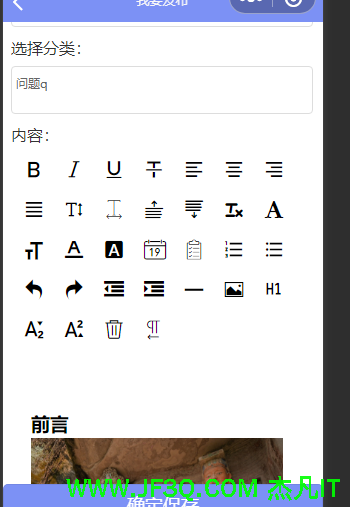
image.png
吧editor搞成子组件嵌入我的发布帖子的父组件里
先来看看子组件的代码
image.png
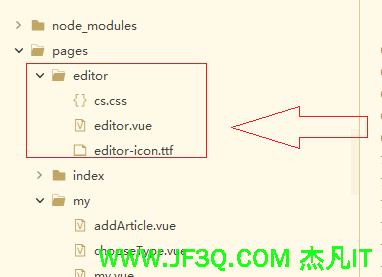
image.png
editor.vue
<template>
	<view class="container">
		<view class="page-body">
			<view class='wrapper'>
				<view class='toolbar' @tap="format">
					<view :class="formats.bold ? 'ql-active' : ''" class="iconfont icon-zitijiacu" data-name="bold"></view>
					<view :class="formats.italic ? 'ql-active' : ''" class="iconfont icon-zitixieti" data-name="italic"></view>
					<view :class="formats.underline ? 'ql-active' : ''" class="iconfont icon-zitixiahuaxian" data-name="underline"></view>
					<view :class="formats.strike ? 'ql-active' : ''" class="iconfont icon-zitishanchuxian" data-name="strike"></view>
					<view :class="formats.align === 'left' ? 'ql-active' : ''" class="iconfont icon-zuoduiqi" data-name="align"
					 data-value="left"></view>
					<view :class="formats.align === 'center' ? 'ql-active' : ''" class="iconfont icon-juzhongduiqi" data-name="align"
					 data-value="center"></view>
					<view :class="formats.align === 'right' ? 'ql-active' : ''" class="iconfont icon-youduiqi" data-name="align"
					 data-value="right"></view>
					<view :class="formats.align === 'justify' ? 'ql-active' : ''" class="iconfont icon-zuoyouduiqi" data-name="align"
					 data-value="justify"></view>
					<view :class="formats.lineHeight ? 'ql-active' : ''" class="iconfont icon-line-height" data-name="lineHeight"
					 data-value="2"></view>
					<view :class="formats.letterSpacing ? 'ql-active' : ''" class="iconfont icon-Character-Spacing" data-name="letterSpacing"
					 data-value="2em"></view>
					<view :class="formats.marginTop ? 'ql-active' : ''" class="iconfont icon-722bianjiqi_duanqianju" data-name="marginTop"
					 data-value="20px"></view>
					<view :class="formats.previewarginBottom ? 'ql-active' : ''" class="iconfont icon-723bianjiqi_duanhouju"
					 data-name="marginBottom" data-value="20px"></view>
					<view class="iconfont icon-clearedformat" @tap="removeFormat"></view>
					<view :class="formats.fontFamily ? 'ql-active' : ''" class="iconfont icon-font" data-name="fontFamily" data-value="Pacifico"></view>
					<view :class="formats.fontSize === '24px' ? 'ql-active' : ''" class="iconfont icon-fontsize" data-name="fontSize"
					 data-value="24px"></view>

					<view :class="formats.color === '#0000ff' ? 'ql-active' : ''" class="iconfont icon-text_color" data-name="color"
					 data-value="#0000ff"></view>
					<view :class="formats.backgroundColor === '#00ff00' ? 'ql-active' : ''" class="iconfont icon-fontbgcolor"
					 data-name="backgroundColor" data-value="#00ff00"></view>

					<view class="iconfont icon-date" @tap="insertDate"></view>
					<view class="iconfont icon--checklist" data-name="list" data-value="check"></view>
					<view :class="formats.list === 'ordered' ? 'ql-active' : ''" class="iconfont icon-youxupailie" data-name="list"
					 data-value="ordered"></view>
					<view :class="formats.list === 'bullet' ? 'ql-active' : ''" class="iconfont icon-wuxupailie" data-name="list"
					 data-value="bullet"></view>
					<view class="iconfont icon-undo" @tap="undo"></view>
					<view class="iconfont icon-redo" @tap="redo"></view>

					<view class="iconfont icon-outdent" data-name="indent" data-value="-1"></view>
					<view class="iconfont icon-indent" data-name="indent" data-value="+1"></view>
					<view class="iconfont icon-fengexian" @tap="insertDivider"></view>
					<view class="iconfont icon-charutupian" @tap="insertImage"></view>
					<view :class="formats.header === 1 ? 'ql-active' : ''" class="iconfont icon-format-header-1" data-name="header"
					 :data-value="1"></view>
					<view :class="formats.script === 'sub' ? 'ql-active' : ''" class="iconfont icon-zitixiabiao" data-name="script"
					 data-value="sub"></view>
					<view :class="formats.script === 'super' ? 'ql-active' : ''" class="iconfont icon-zitishangbiao" data-name="script"
					 data-value="super"></view>
					<view class="iconfont icon-shanchu" @tap="clear"></view>
					<view :class="formats.direction === 'rtl' ? 'ql-active' : ''" class="iconfont icon-direction-rtl" data-name="direction"
					 data-value="rtl"></view>

				</view>

				<editor id="editor"  class="ql-container" placeholder="开始输入..." showImgSize showImgToolbar showImgResize
				 @statuschange="onStatusChange" :read-only="readOnly" @ready="onEditorReady" @blur="getContents">
				</editor>
			</view>
		</view>

	</view>
</template>

<script>
	import {
		baseUrl
	} from '../../js/config.js';
	export default {
		data() {
			return {
                readOnly: false,
				formats: {},
				timer:null,
				editorCtx: {},
			}
		},
		props:["editorDetail","insubmit"],
watch: {
		  insubmit: {
			handler(newVal) {
			  if (newVal) {
				console.log(newVal)
				this.getContents();
			  }
			},
			immediate: true
		  },
			editorDetail: {
				handler(newVal) {
					if (newVal) {
						// 更新最新内容
						this.latestContent = newVal
						// 如果编辑器上下文已经初始化,直接设置内容
						if (this.editorCtx) {
							this.editorCtx.setContents({
								html: newVal,
								success(res) {
								}
							})
						} else {
							// 如果编辑器上下文未初始化,延迟一段时间再尝试
							setTimeout(() => {
								if (this.editorCtx) {
									this.editorCtx.setContents({
										html: newVal,
										success(res) {
										}
									})
								}
							}, 300)
						}
					}
				},
				immediate: true
			}
		},

		mounted(){
					this.onEditorReady()

				},
		methods: {
			// 失去焦点时,获取富文本的内容
			getContents() {
				let _this = this
				this.editorCtx.getContents({
					success(res) {
						_this.$emit('getContents', res.html)
						}
				})
			},

			readOnlyChange() {
				this.readOnly = !this.readOnly
			},
			onEditorReady() {

				setTimeout(()=>{
					//这里是this.createSelectorQuery而不是uni.createSelectorQuery
					//也不是wx.createSelectorQuery。要不然返回null,报错,根本用不了
					//子组件用this,如果直接在父组件里用就写成uni的或者wx的

					this.createSelectorQuery().select('#editor').context((res) => {
						console.log(res)
						this.editorCtx = res.context
						if(this.editorDetail){
							this.editorCtx.setContents({
								html:this.editorDetail,
								success(res) {
								}
							})
						}
					}).exec()
				},100)

			},

			undo() {
				this.editorCtx.undo()
			},
			redo() {
				this.editorCtx.redo()
			},
			format(e) {
				let {
					name,
					value
				} = e.target.dataset
				if (!name) return
				// console.log('format', name, value)
				this.editorCtx.format(name, value)
			},
			onStatusChange(e) {
				const formats = e.detail
				this.formats = formats
			},
			insertDivider() {
				this.editorCtx.insertDivider({
					success: function() {
						console.log('insert divider success')
					}
				})
			},
			clear() {
				this.editorCtx.clear({
					success: function(res) {
						console.log("clear success")
					}
				})
			},
			removeFormat() {
				this.editorCtx.removeFormat()
			},
			insertDate() {
				const date = new Date()
				const formatDate = `${date.getFullYear()}/${date.getMonth() + 1}/${date.getDate()}`
				this.editorCtx.insertText({
					text: formatDate
				})
			},
			insertImage() {
				//上传图片,我没传参,可以使用storage设置参数
				let that=this;
				uni.chooseImage({
					count: 1,
					success: (res) => {
						uni.uploadFile({
							url: baseUrl +'/common/upfile?type=article_detail'  , //仅为示例,非真实的接口地址
							filePath: res.tempFilePaths[0],
							name: 'file',
							header: {},
							formData: {  },
							success: res => {
								uni.hideLoading();
								let d=JSON.parse(res.data);
								console.log(d)
								if (d.status == 1) {
									that.editorCtx.insertImage({
										src: d.obj,
										alt: '图像',
										success: function() {

										}
									})
								}  else {
									 tip(d.msg);
								}
							},
							fail: err => {
								uni.hideLoading();
								 sendfail();
							}
						});

					}
				})
			}
		},
		onLoad() {
			this.baseUrl=baseUrl;
			uni.loadFontFace({
				family: 'Pacifico',
				source: 'url("https://sungd.github.io/Pacifico.ttf")'
			})
		},
	}
</script>

<style>
	@import "./cs.css";
	.wrapper {
		padding: 5px;
	}
	.iconfont {
		display: inline-block;
		padding: 8px 8px;
		width: 24px;
		height: 24px;
		cursor: pointer;
		font-size: 20px;
	}
	.toolbar {
		box-sizing: border-box;
		border-bottom: 0;
		font-family: 'Helvetica Neue', 'Helvetica', 'Arial', sans-serif;
	}
	.ql-container {
		box-sizing: border-box;
		padding: 12px 15px;
		width: 100%;
		min-height: 30vh;
		height: auto;
		background: #fff;
		margin-top: 20px;
		font-size: 16px;
		line-height: 1.5;
	}
	.ql-active {
		color: #06c;
	}
</style>
cs.css
@font-face {
	font-family: "iconfont";
	src: url('./editor-icon.ttf') format('truetype');
}

.iconfont {
  font-family: "iconfont" !important;
  font-size: 16px;
  font-style: normal;
  -webkit-font-smoothing: antialiased;
  -moz-osx-font-smoothing: grayscale;
}

.icon-redo:before {
  content: "\e627";
}

.icon-undo:before {
  content: "\e633";
}

.icon-indent:before {
  content: "\eb28";
}

.icon-outdent:before {
  content: "\e6e8";
}

.icon-fontsize:before {
  content: "\e6fd";
}

.icon-format-header-1:before {
  content: "\e860";
}

.icon-format-header-4:before {
  content: "\e863";
}

.icon-format-header-5:before {
  content: "\e864";
}

.icon-format-header-6:before {
  content: "\e865";
}

.icon-clearup:before {
  content: "\e64d";
}

.icon-preview:before {
  content: "\e631";
}

.icon-date:before {
  content: "\e63e";
}

.icon-fontbgcolor:before {
  content: "\e678";
}

.icon-clearedformat:before {
  content: "\e67e";
}

.icon-font:before {
  content: "\e684";
}

.icon-723bianjiqi_duanhouju:before {
  content: "\e65f";
}

.icon-722bianjiqi_duanqianju:before {
  content: "\e660";
}

.icon-text_color:before {
  content: "\e72c";
}

.icon-format-header-2:before {
  content: "\e75c";
}

.icon-format-header-3:before {
  content: "\e75d";
}

.icon--checklist:before {
  content: "\e664";
}

.icon-baocun:before {
  content: "\ec09";
}

.icon-line-height:before {
  content: "\e7f8";
}

.icon-quanping:before {
  content: "\ec13";
}

.icon-direction-rtl:before {
  content: "\e66e";
}

.icon-direction-ltr:before {
  content: "\e66d";
}

.icon-selectall:before {
  content: "\e62b";
}

.icon-fuzhi:before {
  content: "\ec7a";
}

.icon-shanchu:before {
  content: "\ec7b";
}

.icon-bianjisekuai:before {
  content: "\ec7c";
}

.icon-fengexian:before {
  content: "\ec7f";
}

.icon-dianzan:before {
  content: "\ec80";
}

.icon-charulianjie:before {
  content: "\ec81";
}

.icon-charutupian:before {
  content: "\ec82";
}

.icon-wuxupailie:before {
  content: "\ec83";
}

.icon-juzhongduiqi:before {
  content: "\ec84";
}

.icon-yinyong:before {
  content: "\ec85";
}

.icon-youxupailie:before {
  content: "\ec86";
}

.icon-youduiqi:before {
  content: "\ec87";
}

.icon-zitidaima:before {
  content: "\ec88";
}

.icon-xiaolian:before {
  content: "\ec89";
}

.icon-zitijiacu:before {
  content: "\ec8a";
}

.icon-zitishanchuxian:before {
  content: "\ec8b";
}

.icon-zitishangbiao:before {
  content: "\ec8c";
}

.icon-zitibiaoti:before {
  content: "\ec8d";
}

.icon-zitixiahuaxian:before {
  content: "\ec8e";
}

.icon-zitixieti:before {
  content: "\ec8f";
}

.icon-zitiyanse:before {
  content: "\ec90";
}

.icon-zuoduiqi:before {
  content: "\ec91";
}

.icon-zitiyulan:before {
  content: "\ec92";
}

.icon-zitixiabiao:before {
  content: "\ec93";
}

.icon-zuoyouduiqi:before {
  content: "\ec94";
}

.icon-duigoux:before {
  content: "\ec9e";
}

.icon-guanbi:before {
  content: "\eca0";
}

.icon-shengyin_shiti:before {
  content: "\eca5";
}

.icon-Character-Spacing:before {
  content: "\e964";
}
editor-icon.ttf这个自己百度下载一下吧
子组件的注意事项写了注释的自己看,主要是初始化和上传图片的
父组件引入
<editor1
				:editorDetail="formData.cont"
                                :insubmit="insubmit"
				 @getContents="getContents"
				 class="bg"
					style="min-height: 90vh;"></editor1>
data
//insubit是为了父组件提交数据时修改时间戳,子组件获取getcontexts,这样写是因为用户直接提交不会触发子组件的@blur
insubmit:new Date().getTime()
import editor1 from '../editor/editor.vue'
components: {
			editor1
		},
getContents(html) {
this.formData.cont = html//实时获取文本内容,赋值给cont
},
submit(){
this.insubmit=new Date().getTime()
//用计时器是因为子组件通知父组件需要花费时间,所以提交代码最好等待100ms
setTimeOut(()=>{
提交的ajax
},100)
}注意:
:editorDetail="formData.cont"是父组件吧文本内容传递给子组件,子组件里用props:["editorDetail"]接受参数
在父组件里操作formData.cont就可以了
转成微信小程序后报错null,这里有一版适合小程序的vue写法,主要是初始化和计时器那一块不一样
<template>
	<view class="container">
		<view class="page-body">
			<view class='wrapper'>
				<view class='toolbar' @tap="format">
					<view :class="formats.bold ? 'ql-active' : ''" class="iconfont icon-zitijiacu" data-name="bold"></view>
					<view :class="formats.italic ? 'ql-active' : ''" class="iconfont icon-zitixieti" data-name="italic"></view>
					<view :class="formats.underline ? 'ql-active' : ''" class="iconfont icon-zitixiahuaxian" data-name="underline"></view>
					<view :class="formats.strike ? 'ql-active' : ''" class="iconfont icon-zitishanchuxian" data-name="strike"></view>
					<view :class="formats.align === 'left' ? 'ql-active' : ''" class="iconfont icon-zuoduiqi" data-name="align"
					 data-value="left"></view>
					<view :class="formats.align === 'center' ? 'ql-active' : ''" class="iconfont icon-juzhongduiqi" data-name="align"
					 data-value="center"></view>
					<view :class="formats.align === 'right' ? 'ql-active' : ''" class="iconfont icon-youduiqi" data-name="align"
					 data-value="right"></view>
					<view :class="formats.align === 'justify' ? 'ql-active' : ''" class="iconfont icon-zuoyouduiqi" data-name="align"
					 data-value="justify"></view>
					<view :class="formats.lineHeight ? 'ql-active' : ''" class="iconfont icon-line-height" data-name="lineHeight"
					 data-value="2"></view>
					<view :class="formats.letterSpacing ? 'ql-active' : ''" class="iconfont icon-Character-Spacing" data-name="letterSpacing"
					 data-value="2em"></view>
					<view :class="formats.marginTop ? 'ql-active' : ''" class="iconfont icon-722bianjiqi_duanqianju" data-name="marginTop"
					 data-value="20px"></view>
					<view :class="formats.previewarginBottom ? 'ql-active' : ''" class="iconfont icon-723bianjiqi_duanhouju"
					 data-name="marginBottom" data-value="20px"></view>
					<view class="iconfont icon-clearedformat" @tap="removeFormat"></view>
					<view :class="formats.fontFamily ? 'ql-active' : ''" class="iconfont icon-font" data-name="fontFamily" data-value="Pacifico"></view>
					<view :class="formats.fontSize === '24px' ? 'ql-active' : ''" class="iconfont icon-fontsize" data-name="fontSize"
					 data-value="24px"></view>

					<view :class="formats.color === '#0000ff' ? 'ql-active' : ''" class="iconfont icon-text_color" data-name="color"
					 data-value="#0000ff"></view>
					<view :class="formats.backgroundColor === '#00ff00' ? 'ql-active' : ''" class="iconfont icon-fontbgcolor"
					 data-name="backgroundColor" data-value="#00ff00"></view>

					<view class="iconfont icon-date" @tap="insertDate"></view>
					<view class="iconfont icon--checklist" data-name="list" data-value="check"></view>
					<view :class="formats.list === 'ordered' ? 'ql-active' : ''" class="iconfont icon-youxupailie" data-name="list"
					 data-value="ordered"></view>
					<view :class="formats.list === 'bullet' ? 'ql-active' : ''" class="iconfont icon-wuxupailie" data-name="list"
					 data-value="bullet"></view>
					<view class="iconfont icon-undo" @tap="undo"></view>
					<view class="iconfont icon-redo" @tap="redo"></view>

					<view class="iconfont icon-outdent" data-name="indent" data-value="-1"></view>
					<view class="iconfont icon-indent" data-name="indent" data-value="+1"></view>
					<view class="iconfont icon-fengexian" @tap="insertDivider"></view>
					<view class="iconfont icon-charutupian" @tap="insertImage"></view>
					<view :class="formats.header === 1 ? 'ql-active' : ''" class="iconfont icon-format-header-1" data-name="header"
					 :data-value="1"></view>
					<view :class="formats.script === 'sub' ? 'ql-active' : ''" class="iconfont icon-zitixiabiao" data-name="script"
					 data-value="sub"></view>
					<view :class="formats.script === 'super' ? 'ql-active' : ''" class="iconfont icon-zitishangbiao" data-name="script"
					 data-value="super"></view>
					<view class="iconfont icon-shanchu" @tap="clear"></view>
					<view :class="formats.direction === 'rtl' ? 'ql-active' : ''" class="iconfont icon-direction-rtl" data-name="direction"
					 data-value="rtl"></view>

				</view>

				<editor id="editor"  class="ql-container" placeholder="开始输入..." showImgSize showImgToolbar showImgResize
				 @statuschange="onStatusChange" :read-only="readOnly" @ready="onEditorReady" @blur="getContents">
				</editor>
			</view>
		</view>

	</view>
</template>

<script>
	import {
		baseUrl
	} from '../../config.js';
  import {getToken} from "../../utils/auth";
	export default {
		data() {
			return {
				readOnly: false,
				formats: {},
				timer:null,
				// 存储最新的编辑器内容
				latestContent: '',
			}
		},
		props:["editorDetail"],
		mounted(){
					this.onEditorReady()
				},
		watch: {
			editorDetail: {
				handler(newVal) {
					if (newVal) {
						// 更新最新内容
						this.latestContent = newVal
						// 如果编辑器上下文已经初始化,直接设置内容
						if (this.editorCtx) {
							this.editorCtx.setContents({
								html: newVal,
								success(res) {
								}
							})
						} else {
							// 如果编辑器上下文未初始化,延迟一段时间再尝试
							setTimeout(() => {
								if (this.editorCtx) {
									this.editorCtx.setContents({
										html: newVal,
										success(res) {
										}
									})
								}
							}, 300)
						}
					}
				},
				immediate: true
			}
		},
		methods: {
			// 失去焦点时,获取富文本的内容
			getContents() {
				let _this = this
				if (this.editorCtx) {
					this.editorCtx.getContents({
						success(res) {
							_this.latestContent = res.html
							_this.$emit('getContents', res.html)
							}
					})
				} else {
					// 如果编辑器上下文未初始化,使用最新存储的内容
					this.$emit('getContents', this.latestContent)
				}

			},

			readOnlyChange() {
				this.readOnly = !this.readOnly
			},
			onEditorReady() {
        this.createSelectorQuery().select('#editor').context((res) => {
					if (res && res.context) {
						this.editorCtx = res.context
						// 如果有初始内容,设置到编辑器中
						if (this.editorDetail) {
							this.latestContent = this.editorDetail
							this.editorCtx.setContents({
								html: this.editorDetail,
								success(res) {
								}
							})
						}
					}
				}).exec()
			},

			undo() {
				if (this.editorCtx) {
					this.editorCtx.undo()
				}
			},
			redo() {
				if (this.editorCtx) {
					this.editorCtx.redo()
				}
			},
			format(e) {
				let {
					name,
					value
				} = e.target.dataset
				if (!name) return
				// console.log('format', name, value)
				if (this.editorCtx) {
					this.editorCtx.format(name, value)
				}
			},
			onStatusChange(e) {
				const formats = e.detail
				this.formats = formats
			},
			insertDivider() {
				if (this.editorCtx) {
					this.editorCtx.insertDivider({
						success: function() {
							console.log('insert divider success')
						}
					})
				}
			},
			clear() {
				if (this.editorCtx) {
					this.editorCtx.clear({
						success: function(res) {
							console.log("clear success")
						}
					})
				}
			},
			removeFormat() {
				if (this.editorCtx) {
					this.editorCtx.removeFormat()
				}
			},
			insertDate() {
				const date = new Date()
				const formatDate = `${date.getFullYear()}/${date.getMonth() + 1}/${date.getDate()}`
				if (this.editorCtx) {
					this.editorCtx.insertText({
						text: formatDate
					})
				}
			},
			insertImage() {
				let that=this;
				uni.chooseImage({
					count: 1,
					success: (res) => {
						uni.uploadFile({
							url: baseUrl + "/common/upload", // 上传的图片服务器地址
							header: {
								Authorization: "Bearer " + getToken()
							},
							filePath: res.tempFilePaths[0],
							name: 'file',
							formData: {  },
							success: res => {
								uni.hideLoading();
								let d=JSON.parse(res.data);
								console.log(d)
								if (d.code == 200 && that.editorCtx) {
									that.editorCtx.insertImage({
										src: d.url,
										alt: '图像',
										success: function() {

										}
									})
								}  else {
									uni.showToast({ title: "上传失败", icon: 'error' })
								}
							},
							fail: err => {
								uni.hideLoading();
								 sendfail();
							}
						});

					}
				})
			}
		},
		onLoad() {
			this.baseUrl=baseUrl;
			uni.loadFontFace({
				family: 'Pacifico',
				source: 'url("https://sungd.github.io/Pacifico.ttf")'
			})
		},
	}
</script>

<style>
	@import "./cs.css";
	.wrapper {
		padding: 5px;
	}
	.iconfont {
		display: inline-block;
		padding: 8px 8px;
		width: 24px;
		height: 24px;
		cursor: pointer;
		font-size: 20px;
	}
	.toolbar {
		box-sizing: border-box;
		border-bottom: 0;
		font-family: 'Helvetica Neue', 'Helvetica', 'Arial', sans-serif;
	}
	.ql-container {
		box-sizing: border-box;
		padding: 12px 15px;
		width: 100%;
		min-height: 30vh;
		height: auto;
		background: #fff;
		margin-top: 20px;
		font-size: 16px;
		line-height: 1.5;
	}
	.ql-active {
		color: #06c;
	}
</style>
好博客就要一起分享哦!分享海报
此处可发布评论
评论(0)展开评论
暂无评论,快来写一下吧
展开评论
他的专栏
 java
java  vue
vue  springboot
  Mysql
Mysql  ssm
ssm  小程序
小程序  uniapp
  js和jquery
 他感兴趣的技术
