33.可视化统计功能-柱状图为例

分类: springboot vue 专栏: 【带小白做项目】SpringBoot+Vue后台管理系统 标签: 可视化 柱状图
2025-09-16 21:43:34 533浏览
可视化统计功能-柱状图为例,用的echarts实现的。后端需要用到分组查询-group by
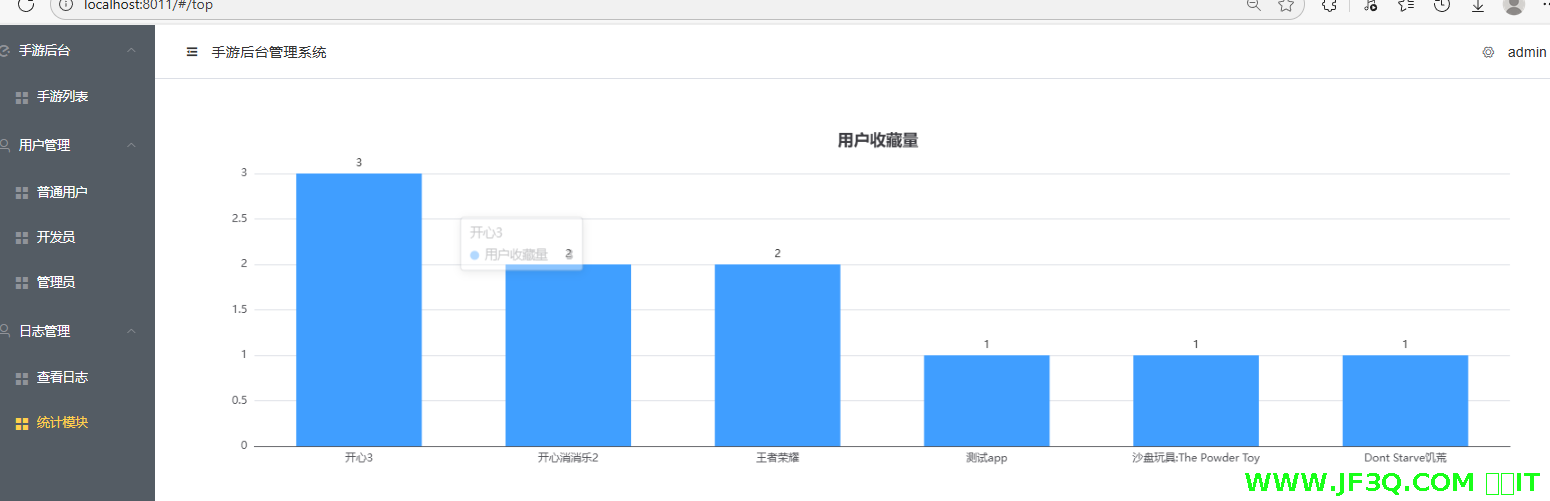
统计哪些 app 收藏量比较高
搞一个柱状图吧,只展示前十名
前端用 echarts
效果图
最终的效果:
先说后端
效果如下
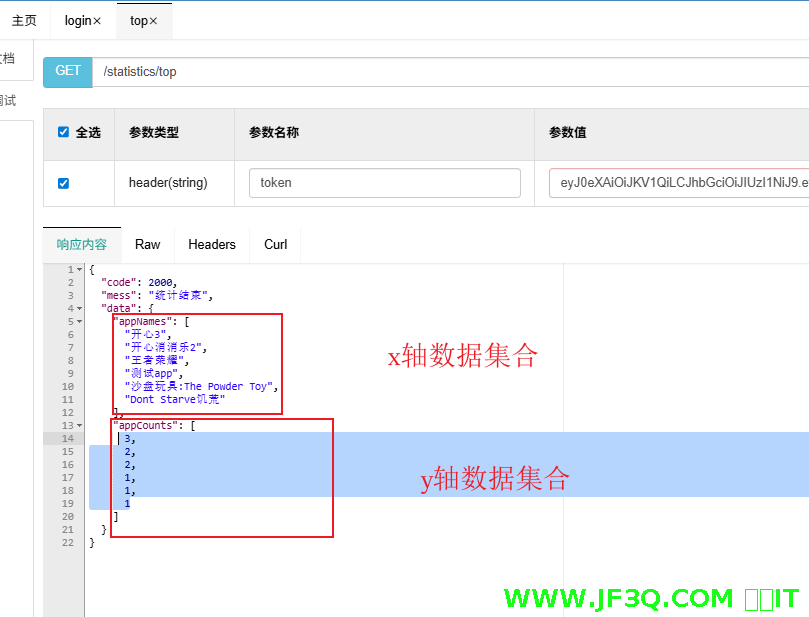
统计 control 层
  @Autowired
    UserinfoCollectService service;

    //统计哪些 app 收藏量比较高 搞一个柱状图吧,只展示前十名

    @GetMapping("/top")
    public ResultVo top(){

        List<TopVo> list = service.top();

        //还得继续封装StatisticsVo
        StatisticsVo statisticsVo = new StatisticsVo();
        statisticsVo.setAppCounts(new ArrayList<>());
        statisticsVo.setAppNames(new ArrayList<>());

        for (TopVo topVo : list) {
            statisticsVo.getAppNames().add(topVo.getAppName());
            statisticsVo.getAppCounts().add(topVo.getAppCount());
        }

        return ResultVo.success("统计结束",statisticsVo);
    }
封装了两个 vo
@Data

public class TopVo {
    String appName;
    Integer appCount;
}
@Data
public class StatisticsVo {
    List<String> appNames;//x轴
    List<Integer> appCounts;//y轴

}
sql 映射文件
   <select id="top" resultType="com.jf3q.app_back.vo.TopVo">
        SELECT
            a.softwareName as appName,
            COUNT(*) AS appCount
        FROM
            user_collect uc
                LEFT JOIN app_info a on uc.appid = a.id
        GROUP BY
            uc.appid
        ORDER BY
            appCount DESC
            LIMIT 0,10
    </select>
补充下下拉调皮的问题
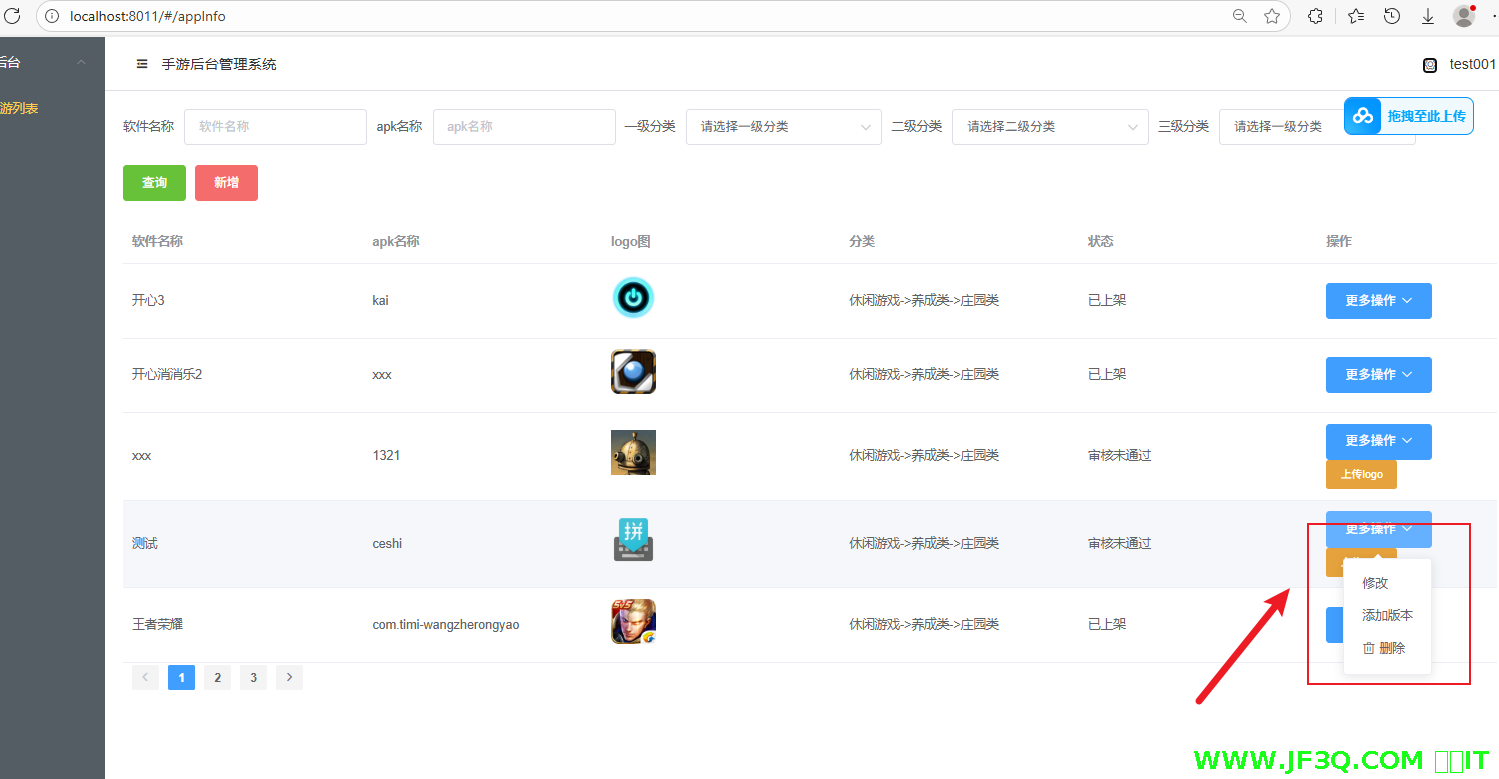
不要用鼠标点,直接光标移动上去就行,耐心一点即可
前端 echarts 代码部分
注意的点
要安装echarts
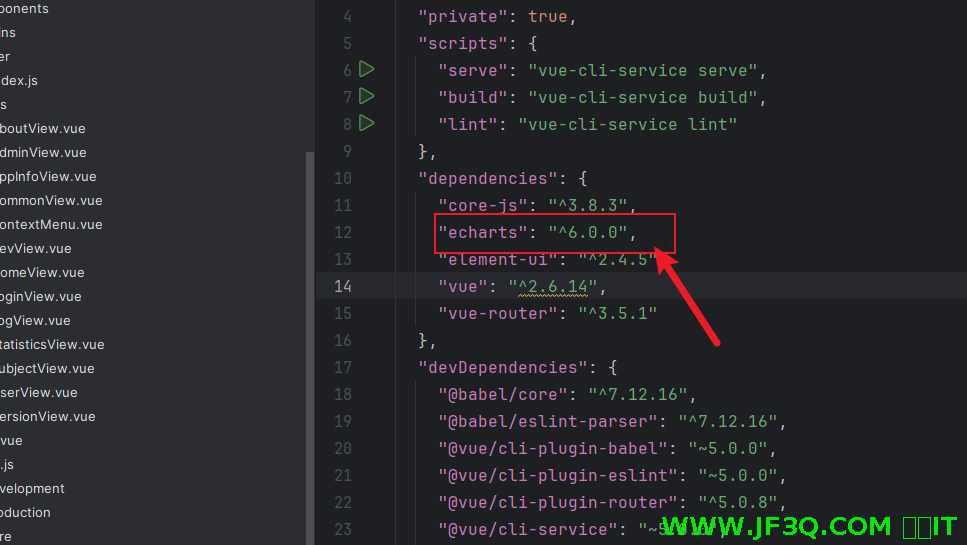
如果没装的话,可以直接用命令 npm install echarts
如果是指定版本安装的话,命令变成:npm install echarts@6.0.0
导入 echarts
import * as echarts from 'echarts'柱状图的话要调用接口获取 x 轴和 y 轴的数据

x 轴和 y 轴的数据一定要跟你的实际接口匹配
完整参考代码
<template>
  <div class="chart-container">
    <div ref="chartDom" style="width: 100%; height: 400px;"></div>
    <!-- 加载状态 -->
    <div v-if="loading" class="loading-overlay">
      <el-loading></el-loading>
    </div>
  </div>
</template>

<script>
import * as echarts from 'echarts'
import { getXY } from '@/api/app'

export default {
  name: 'BarChart',
  props: {
    // 图表标题
    title: {
      type: String,
      default:'用户收藏量'
    },
    // 图表颜色
    color: {
      type: String,
      default: '#409EFF'
    },
    // API请求参数
    params: {
      type: Object,
      default: () => ({})
    }
  },
  data() {
    return {
      chart: null,
      loading: false,
      xAxisData: [],
      yAxisData: []
    }
  },
  mounted() {
    this.fetchData()
    // 监听窗口大小变化
    window.addEventListener('resize', this.resizeChart)
  },
  beforeDestroy() {
    // 组件销毁时,移除事件监听
    window.removeEventListener('resize', this.resizeChart)
    // 销毁图表实例
    if (this.chart) {
      this.chart.dispose()
      this.chart = null
    }
  },
  methods: {
    // 获取数据
    async fetchData() {
      this.loading = true
      try {
        const response = await getXY(this.params)
        console.log("++++++++++++++")
        console.log(response)
        // 假设返回的数据格式为 { xData: [...], yData: [...] }
        this.xAxisData = response.data.appNames
        this.yAxisData = response.data.appCounts
        this.initChart()
      } catch (error) {
        console.error('获取图表数据失败:', error)
        this.$message.error('获取图表数据失败')
      } finally {
        this.loading = false
      }
    },
    // 初始化图表
    initChart() {
      this.chart = echarts.init(this.$refs.chartDom)
      this.updateChart()
    },
    // 更新图表数据
    updateChart() {
      const option = {
        title: {
          text: this.title,
          left: 'center'
        },
        tooltip: {
          trigger: 'axis',
          axisPointer: {
            type: 'shadow'
          }
        },
        grid: {
          left: '3%',
          right: '4%',
          bottom: '3%',
          containLabel: true
        },
        xAxis: {
          type: 'category',
          data: this.xAxisData,
          axisTick: {
            alignWithLabel: true
          }
        },
        yAxis: {
          type: 'value'
        },
        series: [{
          name: this.title,
          type: 'bar',
          barWidth: '60%',
          data: this.yAxisData,
          itemStyle: {
            color: this.color
          },
          label: {
            show: true,
            position: 'top'
          }
        }]
      }
      this.chart.setOption(option)
    },
    // 调整图表大小
    resizeChart() {
      this.chart && this.chart.resize()
    }
  }
}
</script>

<style scoped>
.chart-container {
  width: 100%;
  padding: 20px;
  position: relative;
}

.loading-overlay {
  position: absolute;
  top: 0;
  left: 0;
  right: 0;
  bottom: 0;
  background-color: rgba(255, 255, 255, 0.7);
  display: flex;
  justify-content: center;
  align-items: center;
  z-index: 1;
}
</style>
粉丝宝子可以加下杰哥微信号:jf3qcom
有实在解决不了的问题可以沟通

好博客就要一起分享哦!分享海报
此处可发布评论
评论(0)展开评论
暂无评论,快来写一下吧
展开评论


他的专栏
 新业务
新业务  springboot学习
  ssm框架课
  vue学习
vue学习  【带小白】java基础速成
 他感兴趣的技术
