14我的手游收藏

分类: springboot vue 专栏: 【带小白做项目】springboot和vue前台开发 标签: 前台用户手游收藏列表
2026-01-31 21:20:37 312浏览
我的手游收藏
效果图
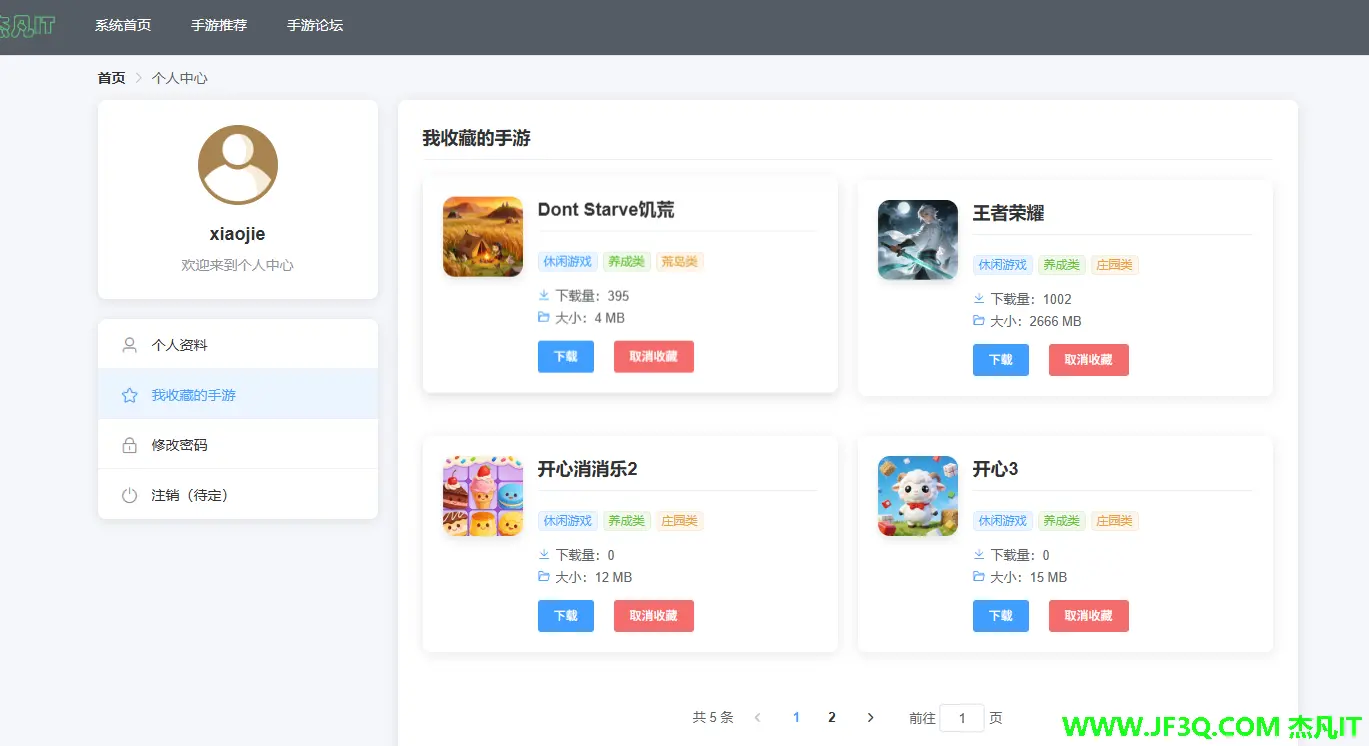
分页展示我的收藏 app
后端注意点
联表查询,把 app 的基本信息以及分类信息也都一起带出来
 <resultMap id="UserCollectWithAppInfo" type="com.jf3q.app_back.domain.UserCollect">
        <id property="id" column="id" />
        <result property="userid" column="userid" />
        <result property="appid" column="appid" />

        <association property="appInfo" javaType="com.jf3q.app_back.domain.AppInfo">
            <id property="id" column="appid" />
            <result property="apkname" column="apkName" />
            <result property="logopicpath" column="logoPicPath" />
            <result property="level1Name" column="level1Name" />
            <result property="level2Name" column="level2Name" />
            <result property="level3Name" column="level3Name" />
            <result property="softwarename" column="softwareName" />
            <result property="logopicpath" column="logoPicPath" />
            <result property="downloads" column="downloads" />
            <result property="softwaresize" column="softwaresize" />
            <result property="versionid" column="versionid" />
        </association>
    </resultMap>
<select id="selectByUserId" resultMap="UserCollectWithAppInfo">

        select
         uc.*,ai.*,c1.categoryname as level1Name,c2.categoryname as level2Name,c3.categoryname as level3Name
        from user_collect uc
        left join app_info ai on ai.id = uc.appid
        left join app_category c1 on c1.id = ai.categoryLevel1
        left join app_category c2 on c2.id = ai.categoryLevel2
        left join app_category c3 on c3.id = ai.categoryLevel3
        where  uc.userid = #{userid}

    </select>
前端注意点
下载最新版
downloadApp(versionId) {
      downloadApp(versionId).then(res => {
        console.log(res);

        // 检查响应是否是文件流还是JSON数据
        try {
          // 尝试将响应转换为JSON,如果成功说明是错误消息
          const jsonData = JSON.parse(new TextDecoder().decode(res));
          if (jsonData.code && jsonData.code == 3001) {

            // this.$message.error(jsonData.mess || jsonData.message || '下载失败');
            MessageBox.confirm(jsonData.mess ,"系统提示",{
                  confirmButtonText:'重新登录',
                  type:'warning',
                  showCancelButton: false
                }

            ).then(()=>{
              router.push("/front/loginOrReg");
            }).catch(() => {
              // 用户点击关闭按钮或取消操作时的处理
              console.log("用户关闭了登录提示框");
            })
            return;
          }

        } catch (e) {
          // 转换失败说明是文件流,继续处理下载
        }

        // 处理文件下载
        const blob = new Blob([res], { type: 'application/vnd.android.package-archive' });
        const downloadElement = document.createElement('a');
        const href = window.URL.createObjectURL(blob); // 创建下载的链接
        downloadElement.href = href;
        downloadElement.download = 'app.apk'; // 下载后文件名
        document.body.appendChild(downloadElement);
        downloadElement.click(); // 点击下载
        document.body.removeChild(downloadElement); // 下载完成移除元素
        window.URL.revokeObjectURL(href); // 释放掉blob对象
      }).catch(error => {
        console.error('下载错误:', error);
        this.$message.error('下载失败,请稍后重试');
      });
    },
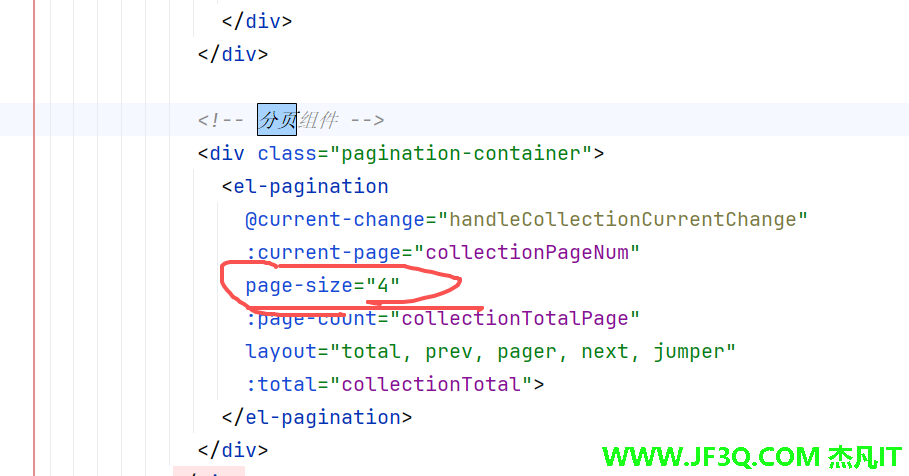
分页注意
好博客就要一起分享哦!分享海报
此处可发布评论
评论(0)展开评论
暂无评论,快来写一下吧
展开评论




他的专栏
 新业务
新业务  springboot学习
  ssm框架课
  vue学习
vue学习  【带小白】java基础速成
 他感兴趣的技术
