5.前后端联调发送axios请求实现分页带条件查询

分类: ssm vue 专栏: 2天速成ssm+vue后台管理系统 标签: ssm vue
2024-12-12 09:23:57 690浏览
发送 axios 请求
1.环境变量配置
前端项目开发完成后,一般会通过nginx部署,需要在nginx中根据特定的路径前缀反向代理到相应的后端,所以给前端项目请求统一添加一个前缀,方便nginx解析
新建.env.development
# 开发环境配置
ENV = 'development'
VUE_APP_BASE_API = '/dev-api'
新建.env.production
# 生产环境配置
ENV = 'production'
VUE_APP_BASE_API = '/prod-api'
修改axios.js
取代jquery.ajax,功能更专一,性能更好
…….
let config = {
  // baseURL: process.env.baseURL || process.env.apiUrl || ""
  // timeout: 60 * 1000, // Timeout
  // withCredentials: true, // Check cross-site Access-Control   /dev-api
  baseURL: process.env.VUE_APP_BASE_API
};
……
在最后一行添加,导出变量给其他模块使用
export {_axios as request}
2.配置代理解决跨域问题
后端接口开发完成后,开发时需要通过代理服务器路由到后端,不再使用mock,所以配置如下,在根目录(跟package.json同级)添加vue.config.js配置代理服务器,将/dev-api开头的请求代理到后端服务器http://localhost:8888
module.exports = {
  devServer:{
    host:'localhost',
    port:8088, //前端项目端口号
    open: true,
    proxy:{
      [process.env.VUE_APP_BASE_API]: {
        target: `http://localhost:8888`, //后端项目地址
        changeOrigin: true,
        pathRewrite: {['^' + process.env.VUE_APP_BASE_API]: ''}
      }
    }
  }
}表示如果通过axios请求后端/user/add的接口,axios会自动加上前缀/dev-api,变成/dev-api/user/add,代理服务器拦截所有/dev-api开头的请求,去掉/dev-api,自动转发到http://localhost:8888/user/add;这样就可以区分静态请求和动态请求了(根据.env配置文件获取前缀)
如果ssm项目未部署在tomcat根目录,则配置target:`http://localhost:tomcat端口号/项目名字`
3.自定义请求后端js
以news api为例,路径:src/api/news.js
此js文件定义调用后端所有功能的js函数
import {request} from '@/plugins/axios'
import ApiPath from '@/api/api_path'

export function list(query) {
    return request({
        url: '/news',
        method: 'GET',
        params: query
    })
}
4. 修改news.vue页面
路径:(src/views/news/index.vue)
在<script>下引入api
import {list,del,add,update} from '@/api/news'然后就可以在页面中调用上面import的函数访问后端了……
后端注意:前端通过axios发送Post或Put请求时,默认是使用的json格式,后端控制器参数需要些@RequetBody 实体类方式接收参数
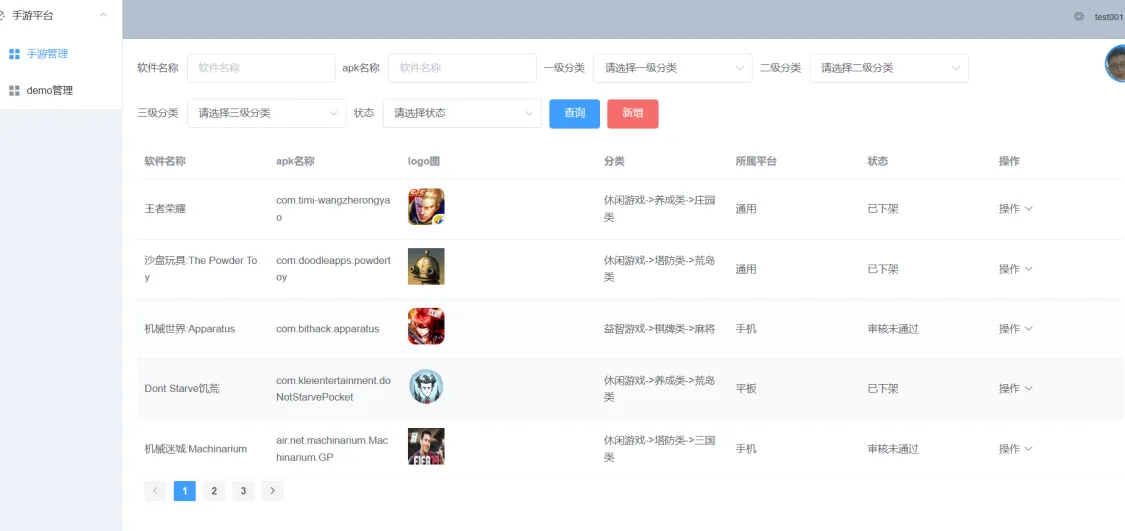
前端核心代码
<template>
  <div>

    <el-form :inline="true" :model="formInline" class="demo-form-inline">
      <el-form-item label="软件名称">
        <el-input v-model="formInline.softwarename" placeholder="软件名称"></el-input>
      </el-form-item>

      <el-form-item label="apk名称">
        <el-input v-model="formInline.apkname" placeholder="apk名称"></el-input>
      </el-form-item>

      <el-form-item>
        <el-button type="primary" @click="onSubmit">查询</el-button>
      </el-form-item>
    </el-form>


    <el-table
        :data="tableData"
        style="width: 100%">
      <el-table-column
          prop="softwarename"
          label="软件名称"
          >
      </el-table-column>
      <el-table-column
          prop="apkname"
          label="apk名称"
          >
      </el-table-column>

      <el-table-column
          label="分类"
      >
        <template slot-scope="scope">
          {{scope.row.level1Name}}->{{scope.row.level2Name}}->{{scope.row.level3Name}}
        </template>
      </el-table-column>

      <el-table-column
          label="状态"
      >
        <template slot-scope="scope">

          {{scope.row.status ==1? '待审核':scope.row.status ==2? '审核通过':scope.row.status ==3? '审核未通过':scope.row.status ==4? '已上架': '已下架'}}
        </template>
      </el-table-column>

      <el-table-column
          label="操作"
      >
        <template slot-scope="scope">

          <el-button type="warning" size="mini" @click="toUpdate(scope.row)">修改</el-button>
          <el-button type="warning" size="mini" @click="toDel(scope.row.id)">删除</el-button>

        </template>
      </el-table-column>
    </el-table>


    <el-pagination
        background
        layout="prev, pager, next"
        :current-page="pageNum"
        :page-size="5"
        :page-count="pages"
        @current-change="changePageNum"
        :total="total">
    </el-pagination>

  </div>
</template>

<script>
import {getAppPage} from "@/api/app";

export default {
  name: "DemoIndex",
  data() {
    return {
      pages: 0,
      total:0,
      pageNum:1,
      tableData:[],

      formInline:{
        softwarename:'',
        apkname: ''
      }
    }
  },
  methods:{

    getPage(){
      //发送axios请求后端
      getAppPage(this.formInline,this.pageNum).then(res => {
        console.log(res);
        this.tableData=res.data.list

        this.pages=res.data.pages
        this.total=res.data.total
        this.pageNum=res.data.pageNum
      })
    },

    changePageNum(val){
      this.pageNum=val
      this.getPage()

    },
    toUpdate(){

    },
    toDel(){

    },
    onSubmit(){

      this.pageNum=1
      this.getPage()

    }
  },
  created() {
    this.getPage()

  }
}
</script>

<style scoped>

</style>
后端核心代码
    public PageInfo getPage(AppInfo appInfo, Integer pageNum) {

        PageHelper.startPage(pageNum,5,"id desc");


       List<AppInfo> list= appInfoMapper.selectBy(appInfo);

       return new PageInfo(list);

    }
<select id="selectBy" resultType="com.jf3q.app.domain.AppInfo">
select
a.*,
c1.categoryName as level1Name,
c2.categoryName as level2Name,
c3.categoryName as level3Name
from app_info a
left join app_category c1 on c1.id= a.categoryLevel1
left join app_category c2 on c2.id= a.categoryLevel2
left join app_category c3 on c3.id= a.categoryLevel3
<where>
<if test="softwarename!= null and softwarename!= ''">
a.softwareName like concat ('%',#{softwarename},'%')
</if>
<if test="apkname!= null and apkname!= ''">
and a.apkName like concat ('%',#{apkname},'%')
</if>
<if test="status!= null ">
and a.status = #{status}
</if>
</where>
</select>好博客就要一起分享哦!分享海报
此处可发布评论
评论(0)展开评论
展开评论
您可能感兴趣的博客
 新业务
新业务  springboot学习
  ssm框架课
  vue学习
vue学习  【带小白】java基础速成